I know I should be grading papers right now, but I wanted to take a break to say hello. I don't want to clog up e-mail with something that is basically irrelevant to your work, but I wanted to catch you up on what's going on down here. I also want to apologize for not calling and for not notifying (some and/or all of) you that I was unable to call.
I arrived in Ocala late Monday night. My first workshop was at 8:30 am for a group of Nursing students. Several of the students had never been in the library before (the allied health building is separate, but I don't think this is an excuse). I completed a total of 5 workshops that day for approximately 100 students. In three of the workshops, I completed a presentation on the start-to-finish process of writing a paper (I call it anatomy of a paper). In the other courses, I completed kind of an APA-mash. Most of the instructors wanted me to talk about APA and writing and databases for the entire period (2 hours). I know that's too much information for students, and at times I know a few of them were bored with just what I covered.
This is the first week that I've tried to be entirely PowerPoint free and I think that I've been pretty successful. I used the white board to list various points and information (in either theme-workshop). In the "anatomy" class, we pretended like we were writing a paper on the topic assigned by the instructor, and worked together to brainstorm, research, etc. I was very impressed by the number of students who interacted with me and provided informed opinions and ideas. I also had many good questions during the APA workshop.
The most unsuccessful workshops by far have been the times that I've done database demonstrations. The demonstrations have been brief - no more than 15 or 20 minutes - but I could tell the students just weren't interested in watching me search. The highlight was when I compared searches in Google to searches in the database. I also related the importance of narrowing a topic to searching in Google - how narrowing can take your results from 800,000 to 800.
I have collected worksheets and surveys in all workshops, if for no other reason than to prove that it most certainly can be done. After collecting the handouts, I immediately stapled them to the worksheet so that I knew how to enter them when I fill out the Excel sheet (which will be on the plane ride home). Most of the feedback has been positive, although I have not examined any of it thoroughly.
Aside from workshops, I've done quite a bit of work cleaning up the library. I begged Hilary to come to Ocala today (and she was a huge help, Thank You Hilary!!!). Together, we weeded about 500 very outdated materials (folks, we just scratched the surface) and purchased about 150 books from Barnes and Noble.
I am trying a new method of cataloging, and we will see how it works. I've entered all of the books into OCLC and given each book a spine label and a barcode. I then entered the ISBN and barcode number into an Excel chart so that I can do the ALEPH portion later even if I'm not in front of the books. This may be a good exercise if you have multiple books to catalog or if you know you're not going to be at the desk for several hours, but will still have access to a computer.
In all, this has been a good but exhausting experience. I've put in 12 hour days (at minimum) all three working days this week, and I haven't touched any of my System responsibilities. I am looking forward to working with a new librarian (we have a great candidate right now) to get that campus back to the place it should be in terms of both resources and services.
10 workshops in 4 days.... 150 books in OCLC in 3 hours.. who knew?
-E
Thursday, January 24, 2008

Wednesday, January 23, 2008
ILS (Midwinter Meeting demos)
Of the ILS I looked at this time, one I particularly like is Innovative Interface (III). Their product is Millennium and new OPAC is Encore. Encore seemed intuitive to use, tagging capability and navigation on the side for material type from results screen. The rep equated the OPAC navigation to social networking. University of Michigan State uses this product. Millennium has a toolbar on the desktop with icons for the different modules (Circ, Cat, etc.). Also, many of the functions could be done from the Web. MARC records in Cat module has free text option. One caveat- have a certain number of user licenses, so staff would need to remember to close the module to have enough available throughout the system. According to the rep, there would be enough licenses for the number of staff.
I am still on the fence about Polaris. They’re not bad, I’m just not 100% sold on it being user-friendly; someone else might think differently. In any case, they are getting more academic libraries using their product. The rep said about 10% are academics and are a “very vocal group”. Toolbar on the desktop with icons for the modules. Pretty basic staff end, but I think some of the icons might be confusing- particularly for the assistants. One nice feature in the Circ module- items can be tracked by campus (returned at X campus, shipped to X campus).
I looked at Virtua which is one of the VTLS products. Same type of toolbar, although this one has small icon groups for each of the 4 modules. In Circ, the patron record looks like a MARC record, but the tags could be changed to have words instead of tag numbers (“Name”). The web OPAC is iPortal and is customizable. At this point I stopped the rep because she said it was “easy to do” by the librarian. I wanted to clarify that we would have tech support and not having to do all this customization! She brought in another rep and there are a number of options. From out of the box where we would control everything, to them controlling, and for anywhere in between.
We know we like TLC but they are lots of $$$$.
All of these are compatible with Connexion.
I wasn’t able to look any Endeavor products, since they were not at Midwinter.
I am still on the fence about Polaris. They’re not bad, I’m just not 100% sold on it being user-friendly; someone else might think differently. In any case, they are getting more academic libraries using their product. The rep said about 10% are academics and are a “very vocal group”. Toolbar on the desktop with icons for the modules. Pretty basic staff end, but I think some of the icons might be confusing- particularly for the assistants. One nice feature in the Circ module- items can be tracked by campus (returned at X campus, shipped to X campus).
I looked at Virtua which is one of the VTLS products. Same type of toolbar, although this one has small icon groups for each of the 4 modules. In Circ, the patron record looks like a MARC record, but the tags could be changed to have words instead of tag numbers (“Name”). The web OPAC is iPortal and is customizable. At this point I stopped the rep because she said it was “easy to do” by the librarian. I wanted to clarify that we would have tech support and not having to do all this customization! She brought in another rep and there are a number of options. From out of the box where we would control everything, to them controlling, and for anywhere in between.
We know we like TLC but they are lots of $$$$.
All of these are compatible with Connexion.
I wasn’t able to look any Endeavor products, since they were not at Midwinter.
Tuesday, January 22, 2008
Assignment calculator...
This is cool... Check out this assignment calculator.
I tried using the U of M calculator.. and in their time line of when to complete certain steps of your assignment, they have links of when to contact the librarians.. I love it.
I tried using the U of M calculator.. and in their time line of when to complete certain steps of your assignment, they have links of when to contact the librarians.. I love it.
Wednesday, January 16, 2008
Crying babies and social hour
I realize that this is not our grandmas' library and I don't have a problem with students talking in the library, but some students actually use the library to study and write papers. There have been complaints to the Dean in the past about noise in the library. In the last two days, there have been some issues. For instance, yesterday a young woman was in to get help from a tutor for her online class. She brought her two-year old child with her. She brought nothing for the child to do, so one of the tutors went to the admissions office to get coloring book and crayons. After the child had colored some, she decided that she might like to color on the equipment. The tutor ended up having to take care of the child, too. Then the little one proceeded to throw a fit - thrashing around on the floor crying and screaming. At that time there were no other students in the library. Ron, the Mentor Center Coordinator who shares the library with me, had to leave to go find a phone elsewhere to make a call. Mom kept saying they were going to leave and they finally did. Then this morning, I was in a webinar for Aleph and there were a group of students socializing and getting rather loud. I said that I hoped no one was trying to study.
Anyone else have any issues and how do you handle them?
Anyone else have any issues and how do you handle them?
Tuesday, January 15, 2008


My display

I'm an ebook fan.. and I try to promote ebooks on my campus... I manage to use ebook covers a lot in my displays.. I print off the covers in color ink.
This display is about New Year's Resolutions.. I also mentioned the RAS fitness blog.
Monday, January 14, 2008
Librarians at for-profit schools
I found a short article in The Chronicle of Higher Education this morning to be interesting:
http://chronicle.com/wiredcampus/article/2661/librarians-at-for-profit-institutions-seek-to-be-heard?utm_source=at&utm_medium=en
As far I as I know, in St. Cloud, we've always been part of our local consortium (Central Minnesota Libraries Exchange) and have been able to buy from any vendor (why would you want to completely cut out a customer?). Has anyone had problems with these issues because of our status?
http://chronicle.com/wiredcampus/article/2661/librarians-at-for-profit-institutions-seek-to-be-heard?utm_source=at&utm_medium=en
As far I as I know, in St. Cloud, we've always been part of our local consortium (Central Minnesota Libraries Exchange) and have been able to buy from any vendor (why would you want to completely cut out a customer?). Has anyone had problems with these issues because of our status?
Thursday, January 10, 2008
January Library Display

For my monthly display for January I decided to do National Mentoring Month. I have a bulletin board just outside of the library that I used to highlight Ron, our Mentor Center Coordinator, and the six tutors. (I call them "Ron and the Tutors," which makes them sound like an alternative rock band.) I asked the tutors to write up short bios and then I took their pictures and put them all on display. Although I had a little bit of grumbling from the tutors, most of them were happy to do it. I included the January tutor schedule, also. I thought it would be nice to highlight them since they really do work hard. We have 119 new students this quarter, so I thought it would be a good idea for them to be able to put names with faces of tutors. For inside the library I made up little signs for the three tables that I will include here also. I have received a lot of positive feedback on this display.

Wednesday, January 09, 2008
hands-on library training for admissions team
Today I met with our campus admissions team and DOA in a computer lab for about an hour so I could properly introduce them to our library. I began by thanking them for being library advocates when they give tours and for introducing me to prospective students. (That helps combat library anxiety, I think.) I told them that I wanted to show them exactly what it is they’re promoting when they tell students we have “a phenomenal online library.” Then we worked our way across the library webpage in a hands-on, interactive way.
• FAQ
• Ask the Librarian (that's why I got the Who is Joe Jones question)
• APA handouts
• NoodleTools (they all set up accounts and made a sample reference page)
• Library catalog and ILL possibilities
• NetLibrary
• Academic Search Premier
The team members and DOA expressed their appreciation for the workshop, and they commented that they learned a great deal about what our library offers. (Somone even e-mailed herself an article she found during the session.) I think it will have a positive impact on what they tell prospective and new students about our library and the tools and resources we provide.
• FAQ
• Ask the Librarian (that's why I got the Who is Joe Jones question)
• APA handouts
• NoodleTools (they all set up accounts and made a sample reference page)
• Library catalog and ILL possibilities
• NetLibrary
• Academic Search Premier
The team members and DOA expressed their appreciation for the workshop, and they commented that they learned a great deal about what our library offers. (Somone even e-mailed herself an article she found during the session.) I think it will have a positive impact on what they tell prospective and new students about our library and the tools and resources we provide.
Tuesday, January 08, 2008
Library Marketing: Why it Absolutely Matters
Yesterday, I (finally) finished typing up the brainstorming sheets from our session at the team meeting about Workshops and Programs. While I hope to spend some blog space talking about each portion of that brainstorming session, marketing is foremost in my mind.
I relate to marketing and marketers. Part of my love of marketing stems from the stigma attached to being a young library director - or a librarian at all. I've had to consistently challenge the views of non-library colleagues, friends and family about the value and rigor of my work. Most conversations about the library with non-librarians have been, at least in part, a sales pitch.
Another part of my love of marketing is my love of making something different out of what already exists. An interior design term for this concept is "repurposing". It's kind of like taking leftover roast turkey and turning it into a casserole or soup. Although, unlike a turkey soup, the results of repurposing related to marketing are usually fresh, innovative, and easy on the eyes & the stomach.
Marketing is vital to our role as librarians. Without a degree in marketing or an understanding of its ins and outs, I'd even argue that it's essential to almost any job. At very least, we must self-market. Very few products in today's world truly sell themselves; the worker bee is the least of these. No matter how good you are at your job, you have to make others aware of the great job that you are doing and the great job that you're going to continue to do. It's not bragging; it's self preservation. What is a commercial other than a company bragging about how good its product is? However, self-marketing is for a different day.
We are not a culture of students and faculty who clamor to the library in search of the depths of our databases, piling on interlibrary loans and seeking obscure texts. I think that as a team we could agree that we are a culture of the "instant answer" - dare I say Google - or maybe even a culture of apathy where no research is preferred to any research. How then, in this culture, can we expect students to seek out tools such as NetLibrary or Points of View? Marketing. Because the secret of marketing is not to tell students what they should use, but instead to reveal to them what they've needed all along.
So how does resource marketing work?
1. Create a need. Consider a carpet cleaner commercial. How many times is something spilled or stained in a commercial? And it's always something impossible to get out - wine or grass stains or ketchup. Consumers who see this commercial can relate to the need. In other words, you need to think about the timing and the audience that you are addressing when you are marketing a database. Are you advertising childcare resources in your child care classroom? What do you put in the Digital Design room?
The need concept works well when marketing to faculty, too. They have needs to provide content related to the course, to provide assignments, to enhance learning, to collaborate. How can a database meet this need?
2. Introduce the product. Yes, we have links to the databases on our website - but how many students and faculty have you spoken to that don't know how to access the Portal? Advertisers use pictures and text everywhere to convey the message that something is available to meet a need. How can you physically market a database to attract a user without singing its merits?
3. Be specific. Don't introduce a suit of databases, or a database and Noodlebib, in one marketing "campaign." Address one need at a time, and address it concisely so that your consumer isn't overwhelmed with data. Very few commercials will try to sell more than one product at a time (unless they are closely related and complement each other).
4. Meet the need. You've introduced a problem to your consumer (and just one problem). How do you solve that problem? A student needs books that they can search. Netlibrary lets you search books - how about that! Remember that you are control of the marketing destiny of each product that you put out there. You have to make up the mind of the consumer before you even put your plan out in public.
5. Use professional tools. Don't create a brochure when a poster will do. Use images instead of text - but make sure they are clean images that don't like copied and altered thrice over. Use easy to read, large fonts in attractive colors. When available, use glossy, heavy-weight papers.
6. Think outside the box. One suggestion from the brainstorm was to use baby bibs to promote Noodlebib. Or, you can create a poster of pastas with a phrase "what's your favorite noodle"? NetLibrary suggests putting a beach chair with a sunhat and sunscreen in a location with a sign on it that says "ebooks wherever you are.. or wherever you want to be". The possibilities for promoting your resources in new and alternative ways that spark interest because you are meeting a need will bring in results.
What are your ideas for marketing our resources?
I relate to marketing and marketers. Part of my love of marketing stems from the stigma attached to being a young library director - or a librarian at all. I've had to consistently challenge the views of non-library colleagues, friends and family about the value and rigor of my work. Most conversations about the library with non-librarians have been, at least in part, a sales pitch.
Another part of my love of marketing is my love of making something different out of what already exists. An interior design term for this concept is "repurposing". It's kind of like taking leftover roast turkey and turning it into a casserole or soup. Although, unlike a turkey soup, the results of repurposing related to marketing are usually fresh, innovative, and easy on the eyes & the stomach.
Marketing is vital to our role as librarians. Without a degree in marketing or an understanding of its ins and outs, I'd even argue that it's essential to almost any job. At very least, we must self-market. Very few products in today's world truly sell themselves; the worker bee is the least of these. No matter how good you are at your job, you have to make others aware of the great job that you are doing and the great job that you're going to continue to do. It's not bragging; it's self preservation. What is a commercial other than a company bragging about how good its product is? However, self-marketing is for a different day.
We are not a culture of students and faculty who clamor to the library in search of the depths of our databases, piling on interlibrary loans and seeking obscure texts. I think that as a team we could agree that we are a culture of the "instant answer" - dare I say Google - or maybe even a culture of apathy where no research is preferred to any research. How then, in this culture, can we expect students to seek out tools such as NetLibrary or Points of View? Marketing. Because the secret of marketing is not to tell students what they should use, but instead to reveal to them what they've needed all along.
So how does resource marketing work?
1. Create a need. Consider a carpet cleaner commercial. How many times is something spilled or stained in a commercial? And it's always something impossible to get out - wine or grass stains or ketchup. Consumers who see this commercial can relate to the need. In other words, you need to think about the timing and the audience that you are addressing when you are marketing a database. Are you advertising childcare resources in your child care classroom? What do you put in the Digital Design room?
The need concept works well when marketing to faculty, too. They have needs to provide content related to the course, to provide assignments, to enhance learning, to collaborate. How can a database meet this need?
2. Introduce the product. Yes, we have links to the databases on our website - but how many students and faculty have you spoken to that don't know how to access the Portal? Advertisers use pictures and text everywhere to convey the message that something is available to meet a need. How can you physically market a database to attract a user without singing its merits?
3. Be specific. Don't introduce a suit of databases, or a database and Noodlebib, in one marketing "campaign." Address one need at a time, and address it concisely so that your consumer isn't overwhelmed with data. Very few commercials will try to sell more than one product at a time (unless they are closely related and complement each other).
4. Meet the need. You've introduced a problem to your consumer (and just one problem). How do you solve that problem? A student needs books that they can search. Netlibrary lets you search books - how about that! Remember that you are control of the marketing destiny of each product that you put out there. You have to make up the mind of the consumer before you even put your plan out in public.
5. Use professional tools. Don't create a brochure when a poster will do. Use images instead of text - but make sure they are clean images that don't like copied and altered thrice over. Use easy to read, large fonts in attractive colors. When available, use glossy, heavy-weight papers.
6. Think outside the box. One suggestion from the brainstorm was to use baby bibs to promote Noodlebib. Or, you can create a poster of pastas with a phrase "what's your favorite noodle"? NetLibrary suggests putting a beach chair with a sunhat and sunscreen in a location with a sign on it that says "ebooks wherever you are.. or wherever you want to be". The possibilities for promoting your resources in new and alternative ways that spark interest because you are meeting a need will bring in results.
What are your ideas for marketing our resources?
Did you know that you can...
...Request a print catalog from AHIMA?
Does anyone else have a publisher that they utilize (online or a print catalog) to share?
Does anyone else have a publisher that they utilize (online or a print catalog) to share?
Thursday, January 03, 2008
Why I Hate Making Student ID Cards
When I ran the signed cards through the color printer to add the photos and logo, the printer jammed and nearly perforated the cards. It jammed twice, so the cards were in sorry shape. The side where the picture was to go got all smudged, so now I've resorted to printing the colored side on regular paper and using a glue stick to affix the colored side to the signed ID card. Hmmm....scissors and glue stick. Reminds me of childhood.
Any good (or not so good) stories about fiascoes while making IDs?
Any good (or not so good) stories about fiascoes while making IDs?
Monday, December 31, 2007
Library use high because of computers
Check out the article below from Reuters. It claims that Gen Y (born (roughly--there is some disagreement on the start and end years of the different Gens) between 1981–1995) uses the library more because of computers and the internet, that in turn, drive the interest for research.
Generation Y biggest user of libraries: survey
http://www.reuters.com/article/newsOne/idUSN2849864420071230
Generation Y biggest user of libraries: survey
http://www.reuters.com/article/newsOne/idUSN2849864420071230
Friday, December 28, 2007
Orientation
Karen I loved the video you did for orientation. I am wondering though if the rest of you have been asked to do a presentation at orientation? All I have done so far is take pictures for the Photo ID's.
I have decided that students will be asked to pick up their ID in the library. That way we will get those new students back in and hopefully we can have a snazzy handout to send with them as to what the library has to offer.
I have decided that students will be asked to pick up their ID in the library. That way we will get those new students back in and hopefully we can have a snazzy handout to send with them as to what the library has to offer.
Friday, December 21, 2007
Bismarck collection
So you've heard Emily and me joke about how small the Bismarck collection is. Check out this slideshow to see far the collection has already come.


EBSCO's new Visual Search
The redesigned Visual Search for EBSCOhost is up and running. It's quite different from the old way, but I think the new format is better at showing the thought process behind narrowing a search topic. When you first open up Visual Search, a flash tutorial runs automatically to explain the features and how to use them.
New ILS - Input Please
In our quest for a new ILS, Heather (formerly @Mankato) and I looked at different vendors at ALA Annual in June. Our notes, including websites, are available on CHIPSnet in the OPAC Committee folder. Also in the folder is an article with info on various vendors (i.e., which ones are used in academic libs). As I mentioned on our call this week, I'll be attending Midwinter next month. Any feedback beforehand would be appreciated - which vendors do you want more in-depth information on their product(s)? Which ones don't you like? Emily can correct me of course if I'm wrong, but I think we're steering clear of open-source systems and SirsiDynix. We like TLC, but are looking at others as well. Thanks!!
Wednesday, December 19, 2007
Web 2.0 Webinar (WebJunction)
WebJunction is offering a January 16 webinar about ways to use Web 2.0 to increase a library's service to the community. (1:00 to 2:00 Central Time) See the summary and instructions for attending . Registration is optional, and the webinar is free.
Do students retain information literacy training?
I think that by now.. a lot of you are already reading Stephen's Lighthouse! ... but I thought this article was interesting about how much students retain about IL..
Tuesday, December 18, 2007
Student Orientation update
I have to say, I'm pretty darn pleased with how this turned out. We had the first of four student orientations today, and for the most part, it went well. I wanted to create the library portion as more interactive as opposed to just me spewing out statistics. I came up with the theme of a library "quiz" - the new students' first quiz of what they might know, and what they should know, about the Rasmussen College Library System.
I created the slides first with Office 2007, but I wanted to get them into the library and use the AWESOME large monitors on the Mac. To do that, of course, I needed to figure out Mac's version of PowerPoint - KeyNote. I then was able to publish it with QuickTime! You'll need to pause the "movie" to read all the bullet points. Thanks to Chandra for the awesome "Librarian Secrets to Success!"
Orientation #2 is tomorrow night.
Explore your inner librarian
Check out this cool sight that I again discovered through Stephen's Lighthouse.
Friday, December 14, 2007
Student Orientation
Question .... I'm trying to come up with some fun and interesting ways for the library intro portion of the student orientation. I have a few ideas, but I thought I'd throw this out to the group. :)
Thursday, December 13, 2007
Virtual Reference:
I realize I had informed you that I had set up a Meebo account but hadn’t made an official post on it yet. As you know, Rasmussen College Library will hopefully be implementing a chat reference service for the students.
The first decision that needed to be made was which software would be used. In order to reach as many students as possible, an aggregator is necessary. I was familiar with Trillian and while I did find librarians online who used this service, Meebo was the more popular choice with libraries. It works as an aggregator like Trillian or GAIM but doesn’t require a software download. Plus, the widget allows people who don’t have a MSN, AIM, Yahoo…etc. account to still participate in the discussion.
Meebo
Our account is RasColLib and I’ve already affiliated AIM, Yahoo, Gtalk and MSN accounts to the Meebo account. (I'll let Emily distribute the password.) Therefore, if a student prefers to IM the librarian via their chat software instead of the Meebo widget on the library page, they can.
Features:
Widgets: Chat windows connecting to RasColLib can be embedded in different parts of the Rasmussen College website.
Logs: Meebo does keep logs but only if the Meebo user is chatting with someone who has a username. Anonymous communication, which is chiefly what comes through a public Meebo widget, is not logged. If records about these communications are to be kept, a separate system will need to be set up.
Customizable Away Messages: If you’re logged in but have to step away for a bit, students can see when you’ll be back. Plus, they can still leave questions in the window to be answered later.
File Transfers: A student can send files via Meebo but for security reasons, you still may want them to e-mail any document to you.
Text, Video & Audio Chats: These are other parts of Meebo that is accessible as long as you’re not chatting with an anonymous user. MeeboRooms, however, do allow anonymous chatters to join a conversation. With Rooms, there is the risk that non-RCL using participants will join it.
There is the beginning. The next step will be testing it out on real students and professors to discover what trends they may have that will help shape the future of virtual reference at Rasmussen.
If you'd like to read more about where to go from here, Amanda Etches-Johnson at blogwithoutalibrary.net has a few helpful resources about what should be considered when developing an IM chat service.
Amanda's presentation on incorporating IM PDF
IM Road MapPDF
And if you feel inclined, drop me a line to chat or ask questions:
~Krista
The first decision that needed to be made was which software would be used. In order to reach as many students as possible, an aggregator is necessary. I was familiar with Trillian and while I did find librarians online who used this service, Meebo was the more popular choice with libraries. It works as an aggregator like Trillian or GAIM but doesn’t require a software download. Plus, the widget allows people who don’t have a MSN, AIM, Yahoo…etc. account to still participate in the discussion.
Meebo
Our account is RasColLib and I’ve already affiliated AIM, Yahoo, Gtalk and MSN accounts to the Meebo account. (I'll let Emily distribute the password.) Therefore, if a student prefers to IM the librarian via their chat software instead of the Meebo widget on the library page, they can.
Features:
Widgets: Chat windows connecting to RasColLib can be embedded in different parts of the Rasmussen College website.
Logs: Meebo does keep logs but only if the Meebo user is chatting with someone who has a username. Anonymous communication, which is chiefly what comes through a public Meebo widget, is not logged. If records about these communications are to be kept, a separate system will need to be set up.
Customizable Away Messages: If you’re logged in but have to step away for a bit, students can see when you’ll be back. Plus, they can still leave questions in the window to be answered later.
File Transfers: A student can send files via Meebo but for security reasons, you still may want them to e-mail any document to you.
Text, Video & Audio Chats: These are other parts of Meebo that is accessible as long as you’re not chatting with an anonymous user. MeeboRooms, however, do allow anonymous chatters to join a conversation. With Rooms, there is the risk that non-RCL using participants will join it.
There is the beginning. The next step will be testing it out on real students and professors to discover what trends they may have that will help shape the future of virtual reference at Rasmussen.
If you'd like to read more about where to go from here, Amanda Etches-Johnson at blogwithoutalibrary.net has a few helpful resources about what should be considered when developing an IM chat service.
Amanda's presentation on incorporating IM PDF
IM Road MapPDF
And if you feel inclined, drop me a line to chat or ask questions:
~Krista
Monday, December 10, 2007
Is anyone else "Twittering"?
Are you "Twittering"? What do you use Twitter for? Would this be useful for librarians? Would this be useful for us?
Friday, December 07, 2007
Open APA workshop success..
I have to share.. I did a workshop on Wednesday night, and 9 people came. I ran out of pizza! It was very exciting. To get the students there, I enticed them with advertising pizza and opportunities to get extra credit. I think most students were there for the extra credit.
I know some librarians are against bribing students with pizza or extra credit, BUT I made the students work. I got them in the door with the pizza and extra credit, but I think all the students learned a lot about APA/Noodlebib/paraphrasing/quoting. I created the powerpoint to be about Minnesota and specifically the Vikings.
You know the slide in Emily's ppt that has 2 columns?
You do not have to credit ____, you do have to credit ____? Well, I changed that slide to:
no credit: It snows in Minnesota
credit: The Metro region averaged 35.5 inches of snow in '06-07
no credit: Ice fishing is dangerous when there isn't enough ice
credit: Pickup trucks and large fish houses should be on ice at least 12 inches thick.
no credit: Minnesota is the home to the Minnesota Vikings football team.
credit: Ragnar is the Vikings' team mascot. He holds the current world record for fastest time shaving a beard with an ax.
*Since these MNstats were interesting to the students, I could tell that they were digesting the information.
Then, I had them practice paraphrasing and quoting from an article that I printed from the Minneapolis Star Tribune about the Vikings. I had them use Noodlebib to get a citation for that article. The students (especially males) were really engaged with reading the Vikings article and having to put the football article into their own words. I love using pop culture/regional culture to "make it click" with students.
I know some librarians are against bribing students with pizza or extra credit, BUT I made the students work. I got them in the door with the pizza and extra credit, but I think all the students learned a lot about APA/Noodlebib/paraphrasing/quoting. I created the powerpoint to be about Minnesota and specifically the Vikings.
You know the slide in Emily's ppt that has 2 columns?
You do not have to credit ____, you do have to credit ____? Well, I changed that slide to:
no credit: It snows in Minnesota
credit: The Metro region averaged 35.5 inches of snow in '06-07
no credit: Ice fishing is dangerous when there isn't enough ice
credit: Pickup trucks and large fish houses should be on ice at least 12 inches thick.
no credit: Minnesota is the home to the Minnesota Vikings football team.
credit: Ragnar is the Vikings' team mascot. He holds the current world record for fastest time shaving a beard with an ax.
*Since these MNstats were interesting to the students, I could tell that they were digesting the information.
Then, I had them practice paraphrasing and quoting from an article that I printed from the Minneapolis Star Tribune about the Vikings. I had them use Noodlebib to get a citation for that article. The students (especially males) were really engaged with reading the Vikings article and having to put the football article into their own words. I love using pop culture/regional culture to "make it click" with students.
§
Thursday, December 06, 2007
Proof that marketing works
Last night, I sent all students an e-mail with an attached list of the items added to the library within the last two weeks, along with their dot sections. About noon today, a student walked into the library, headed straight to the Office Management shelf, and selected a brand new book about Office 2007. The book hadn't even been on the shelf for 18 hours.
Plus, I'm relieved to know that at least one student reads the e-mails I send.
Plus, I'm relieved to know that at least one student reads the e-mails I send.
RSS In Plain English
I love this site!
It's called Common Craft-Explanations In Plain English. They work with clients and create videos for-profit, but they also create basic educational videos on Web 2.0 technologies.
They have them for:
Blogs
Wikis
Social Networking
and
Social Bookmarking to name a few.
I find their videos to be very well done. In short videos, they explain the basics of each technology and how it can improve a user's online experience. If a student or teacher ever inquires about them, I recommend showing them this site as I don't think I've seen an introduction that has been as clear as these are.
My favorite video is the RSS video below.
It's called Common Craft-Explanations In Plain English. They work with clients and create videos for-profit, but they also create basic educational videos on Web 2.0 technologies.
They have them for:
Blogs
Wikis
Social Networking
and
Social Bookmarking to name a few.
I find their videos to be very well done. In short videos, they explain the basics of each technology and how it can improve a user's online experience. If a student or teacher ever inquires about them, I recommend showing them this site as I don't think I've seen an introduction that has been as clear as these are.
My favorite video is the RSS video below.
~Krista Jacobson
Flickr groups
FYI, there are a couple of Rasmussen College groups on Flickr.
Rasmussen College / New Construction
Rasmussen College Photowalks
Rasmussen College / New Construction
Rasmussen College Photowalks
Meeting with the Admission Reps...
I met with the Reps on Friday and, all in all, it went well. I started off very generally - I used the opportunity for a lesson in what librarianship is about and the various hats I wear.
I had a packet of stuff for them, everything from the ALA's Bill of Rights to how the RCLS is set up. I used a version of Chandra's RCLS sheet, as well as a run-down on the services and materials we as a system hold.
I ended with two ABSOLUTES they needed to always remember, especially when they give tours:
I had a packet of stuff for them, everything from the ALA's Bill of Rights to how the RCLS is set up. I used a version of Chandra's RCLS sheet, as well as a run-down on the services and materials we as a system hold.
I ended with two ABSOLUTES they needed to always remember, especially when they give tours:
- Whenever possible, ALWAYS bring in potential students into the library. I've had many just by-pass the library all together. No one is here right now. There is no reason not to come into the library.
- NEVER start off by saying, "I know this library is small, but ...." Instead, I suggested something like, "What you see here is the tip of the iceberg for all of the resources that are available to you."
Meebo @ your library
If we decide to do chat reference, here is a posting from Stephen's Lighthouse that is interesting. The Topeka and Shawnee County Public Library also has Meebo loading as soon as you connect to the homepage. One of the articles I included in my annotated bibliography on Virtual Reference talked about having the popular IM systems loaded onto the library computers with the librarian already programmed into the buddy list
posted by our illustrious leader ...
What is Plagiarism?
It's in the My Rasmussen College blog created by Mark Krupinski. Nice Job, Emily!
It's in the My Rasmussen College blog created by Mark Krupinski. Nice Job, Emily!
Wednesday, December 05, 2007
To Excel or not to Excel (well), that is the question!:-)
A couple of tips on how to work faster in Excel
Fast Data Entry in Excel, from PC Magazine.
http://www.pcmag.com/article2/0,2704,2224429,00.asp
Fast Data Entry in Excel, from PC Magazine.
http://www.pcmag.com/article2/0,2704,2224429,00.asp
What do you do...
When you get new books, what do you do with the CD-ROMs that are in the little envelopes in the back of the books? Do you leave them in the envelopes, or do you remove them and keep them in cases behind your desk, or...?
Cataloging blogs
I thought this was interesting...
How do you catalog a blog?
This librarian contemplates cataloging them as a serial..
How do you catalog a blog?
This librarian contemplates cataloging them as a serial..
Friday, November 30, 2007
Info Lit Faculty Packet work sessions
This week I held two work sessions for faculty members so that they could receive help on completing the annotated bibliography from the Info Lit training packet. I think the sessions were quite revealing.
We began by going over the history of the Info Lit committee and the introduction included at the beginning of the packet. After highlighting the contents of the packet, I explained the purpose for the annotated bibliography component, and then we went to work. There were very few questions about the packet, and I was never asked why they were being given a task to complete.
Seven instructors and campus leaders (all of whom teach classes now and then) attended. Within the group, there was quite a range of experience with scholarly research and library databases. Some were old pros and got right to work; others could not log into the portal or find the databases without assistance. (Two who couldn't log in had attended database training a year ago, so that shows me how little they've used what I taught them.)
One of my intentions in holding a work session was so that the instructors could share strategies and learn from each other, and that is exactly what happened. I was impressed at the amount of peer teaching that took place. Also, I had hoped that holding a work session with librarian and peer assistance would decrease the anxiety of those who were less familiar with research and citations. I think that was accomplished, but to a lesser degree.
So what did I learn?
1. I need to make a quarterly effort to provide database instruction to adjuncts and full timers, regardless of how long they've been teaching here or whether they attended an intense training session a year ago.
2. Even if someone has been taught how to access to resources, they may not have ever used the electronic library or catalog in a practical application. I think that's true not only of faculty but also of students.
If you have not already done so, I'd encourage you to host a work session for your faculty members as they complete their annotated bibliographies. My faculty members expressed that they were grateful that I had held the sessions.
We began by going over the history of the Info Lit committee and the introduction included at the beginning of the packet. After highlighting the contents of the packet, I explained the purpose for the annotated bibliography component, and then we went to work. There were very few questions about the packet, and I was never asked why they were being given a task to complete.
Seven instructors and campus leaders (all of whom teach classes now and then) attended. Within the group, there was quite a range of experience with scholarly research and library databases. Some were old pros and got right to work; others could not log into the portal or find the databases without assistance. (Two who couldn't log in had attended database training a year ago, so that shows me how little they've used what I taught them.)
One of my intentions in holding a work session was so that the instructors could share strategies and learn from each other, and that is exactly what happened. I was impressed at the amount of peer teaching that took place. Also, I had hoped that holding a work session with librarian and peer assistance would decrease the anxiety of those who were less familiar with research and citations. I think that was accomplished, but to a lesser degree.
So what did I learn?
1. I need to make a quarterly effort to provide database instruction to adjuncts and full timers, regardless of how long they've been teaching here or whether they attended an intense training session a year ago.
2. Even if someone has been taught how to access to resources, they may not have ever used the electronic library or catalog in a practical application. I think that's true not only of faculty but also of students.
If you have not already done so, I'd encourage you to host a work session for your faculty members as they complete their annotated bibliographies. My faculty members expressed that they were grateful that I had held the sessions.
Thursday, November 29, 2007
100th Post & Bibliographies
Greetings Team!
Congratulations to Krista (and the whole team, really) for the 100th blog post yesterday. I am pleased with ALL of your efforts and participation in this environment, and I think that it has been extremely beneficial as a professional development & discussion tool.
On to other matters!
Please don't just use your catalog to search for items to add to your bibliographies. You may have missing items that you have not yet deleted (you may not even know that they are missing). If you want to use the catalog for an initial search, fine, but please pull the books from the shelves to verify they exist. The last thing we need is to have someone come in searching for (or requesting) a book that you don't actually have.
If nothing else, think of the bibliographies as a most excellent collection development tool. By knowing your gaps, you can seek to improve your collection rather precisely.
-E
Congratulations to Krista (and the whole team, really) for the 100th blog post yesterday. I am pleased with ALL of your efforts and participation in this environment, and I think that it has been extremely beneficial as a professional development & discussion tool.
On to other matters!
Please don't just use your catalog to search for items to add to your bibliographies. You may have missing items that you have not yet deleted (you may not even know that they are missing). If you want to use the catalog for an initial search, fine, but please pull the books from the shelves to verify they exist. The last thing we need is to have someone come in searching for (or requesting) a book that you don't actually have.
If nothing else, think of the bibliographies as a most excellent collection development tool. By knowing your gaps, you can seek to improve your collection rather precisely.
-E
Wednesday, November 28, 2007
Ma.gnolia Is Coming
As you may know, one of the tasks Emily assigned to me this semester was to pick a social bookmarking site to host the program links. After casually looking at a few options, it came down to Del.icio.us and Ma.gnolia. They're both free, popular and relatively well established as social bookmarking sites. In the end, I suggested Ma.gnolia for a couple of reasons.
I know you guys are having a webinar introducing you to Ma.gnolia if you aren't already aware of how it works. I don't want to repeat too much of what you'll cover tomorrow so I will just leave you with a link to a written tutorial on Ma.gnolia's site.
Ma.gnolia tutorial
Add-Ons:
Here is a link sto Ma.gnolia's page of draggable boomarks to add to the browser. The link they provide here only gives you a link to bookmark a page. It does not take you to your links.
- Visually, it's more appealing.
- The are many different RSS feed options available including simple feeds that only list the title of the website and more advanced feeds that include a thumbnail glimpse at the website. Additionally, all the coding is already written out for you.
- The content of the main page of the bookmarked site is saved so even if the site disappears, you should be able to access the content of that original page to see what was once there.
- Bookmarks can be rated from one to five stars. If there is a site we feel is especially good, it can be stressed with these ratings.
- It's more social. While Del.icio.us has networks, Ma.gnolia has groups. Groups consist of many different users adding bookmarks into a common area. The great thing about groups is that more than one user can rate the bookmarks. Theoretically, the bookmarks could be opened to ratings by professors and students. Right now, there will be only one user account but starting in Ma.gnolia will make the transition to a group easier should that route be chosen.
- Different tags are separated by commas when they're being entered. For instance, if I were to add tags to this blog in Ma.gnolia, I could have a tag "Rasmussen College Library." If I were to enter that same tag in De.licio.us, Rasmussen, College and Library would be considered three different tags. If I wanted all of that information in one tag, I'd have to write RasmussenCollegeLibrary.
I know you guys are having a webinar introducing you to Ma.gnolia if you aren't already aware of how it works. I don't want to repeat too much of what you'll cover tomorrow so I will just leave you with a link to a written tutorial on Ma.gnolia's site.
Ma.gnolia tutorial
Add-Ons:
Here is a link sto Ma.gnolia's page of draggable boomarks to add to the browser. The link they provide here only gives you a link to bookmark a page. It does not take you to your links.
Online Courses Catch On in U.S. Colleges
Series I heard on NPR's Morning Edition. Second part will air Thursday morning.
To WOW or to MOM - that's the question...
I love this post from the Annoyed Librarian. I think it brought up some very good points. A good librarian should be dedicated and dependable. A good librarian should be "happy to help". A good librarian should be a "cheerleader" to their clientèle.
I do not agree, however, that we shouldn't market ourselves or that we should be "boring", but I get the point of the anonymous blogger.
What do you think?
I do not agree, however, that we shouldn't market ourselves or that we should be "boring", but I get the point of the anonymous blogger.
Librarians should be welcoming but not too pushy, helpful but not too invasive. Librarians should say, come on in, sit down, have a cuppa, and tell mom what you're looking for.Read the comments too! Lots of thoughtful feedback.
What do you think?
Monday, November 26, 2007
Blerb for Admission Reps
I'm meeting with my campus' admission reps on Friday to tell them what TO say (and what not to say) to prospective students. Has anyone else done so? Success? What exactly did you tell them? Any and all guidance and particulars would be appreciated!
Pillars of the Earth
I have Pillars of the Earth on my list of books to read.
If any of you are planning on using this book for a book club, I thought you might be interested in this game.
If any of you are planning on using this book for a book club, I thought you might be interested in this game.
Wednesday, November 21, 2007
Cataloging Links
Greetings,
I've stretched my 2.0 "legs" to offer you the links that were provided at the Cataloging Training from last week, via Delicious:
http://del.icio.us/edoc918/cataloging
I've stretched my 2.0 "legs" to offer you the links that were provided at the Cataloging Training from last week, via Delicious:
http://del.icio.us/edoc918/cataloging
Adding Links to Posts
Greetings,
Many of you have done a great job posting in the past few weeks. I wanted to add a tip for you - adding links to other websites in your post. Blogger makes this task extremely simple, and they provide a how-to in the Help File.
Essentially, this tool allows you to add in a link without having to worry about the HTML tags (who wants to deal with that, anyway?) and without having the whole link listed in-text in the blog.
Happy Linking!
Many of you have done a great job posting in the past few weeks. I wanted to add a tip for you - adding links to other websites in your post. Blogger makes this task extremely simple, and they provide a how-to in the Help File.
Essentially, this tool allows you to add in a link without having to worry about the HTML tags (who wants to deal with that, anyway?) and without having the whole link listed in-text in the blog.
Happy Linking!
How-To Tip of the Day: Win Zip
Good Afternoon:
Many of you have asked about creating or using Zip files as a way to compress and send documents via e-mail. This is especially useful when you are sending large documents (such as Publisher files or videos) or when you are sending multiple files in one e-mail (like when you are sending me or your dean your monthly reports).
I am a big fan of the Win Zip software. It's easy to use and free to try for the first 45 days or so. After that, it costs around $30 (which can be expensed); you can also try talking to your IT person about getting a free copy.
You can find other Zip software programs at The Free Site.
No matter what program you use, they all have some basic properties. Essentially, you have to create a Zip file (the equivalent of a new folder). Once you have named your folder and put it somewhere (Your Documents, H Drive, etc.), you then add the files to it that need to be compressed. Some programs will compress the files automatically; others, you will need to click somewhere or execute the file in order to compress it.
Some programs give you the option of making the file "executable"; meaning that the file that you send via e-mail can automatically be opened by the user and decompressed. Fair warning if you do not select that option, as the user will have to have the same software as you in order to access the files.
The help files for most of these programs should give you sufficient "how-to", but there are plenty available on the web for the use of these software. If you are using WinZip, a very good tutorial is avaialble at this website. A quick Google of "how to use Win zip" yields about 2 million results.
Many of you have asked about creating or using Zip files as a way to compress and send documents via e-mail. This is especially useful when you are sending large documents (such as Publisher files or videos) or when you are sending multiple files in one e-mail (like when you are sending me or your dean your monthly reports).
I am a big fan of the Win Zip software. It's easy to use and free to try for the first 45 days or so. After that, it costs around $30 (which can be expensed); you can also try talking to your IT person about getting a free copy.
You can find other Zip software programs at The Free Site.
No matter what program you use, they all have some basic properties. Essentially, you have to create a Zip file (the equivalent of a new folder). Once you have named your folder and put it somewhere (Your Documents, H Drive, etc.), you then add the files to it that need to be compressed. Some programs will compress the files automatically; others, you will need to click somewhere or execute the file in order to compress it.
Some programs give you the option of making the file "executable"; meaning that the file that you send via e-mail can automatically be opened by the user and decompressed. Fair warning if you do not select that option, as the user will have to have the same software as you in order to access the files.
The help files for most of these programs should give you sufficient "how-to", but there are plenty available on the web for the use of these software. If you are using WinZip, a very good tutorial is avaialble at this website. A quick Google of "how to use Win zip" yields about 2 million results.
Distance Learning
Nicole over at What I Learned Today posted a list of Distance Education Programs offered by various Colleges and Universities across these great United States.
Some of the programs are for MLS, other Doctorate. Now, I'm not suggesting that any of you try to tack on another degree, but you may want to consider taking a course or two to improve a specific skill set.
The college does offer some tuition reimbursement and other benefits for continuing education. Most of you do have some kind of monies available for professional development beyond your State Conference and the Team Meeting - so if you choose to invest it this way, so be it.
As we seek out ways to share internet links more efficiently (i.e., social bookmarking), we will work to specifically identify free resources for Professional Development for librarians.
-E
Some of the programs are for MLS, other Doctorate. Now, I'm not suggesting that any of you try to tack on another degree, but you may want to consider taking a course or two to improve a specific skill set.
The college does offer some tuition reimbursement and other benefits for continuing education. Most of you do have some kind of monies available for professional development beyond your State Conference and the Team Meeting - so if you choose to invest it this way, so be it.
As we seek out ways to share internet links more efficiently (i.e., social bookmarking), we will work to specifically identify free resources for Professional Development for librarians.
-E
Tuesday, November 20, 2007
New electronic book reader--maybe this one will stick around???!?
Article on new reader sold through Amazon.com. Kinda slams it on the tech/aesthetics side of it--I found it more interesting about the other 'plastic' paper that has been created.
Amazon.com Hopes To Kindle Interest With E-BookAmazon's e-reader is supposed to be the future of books. So why does it look as if it was built last century?
By Andy Greenberg
View the Article Here
Amazon.com Hopes To Kindle Interest With E-BookAmazon's e-reader is supposed to be the future of books. So why does it look as if it was built last century?
By Andy Greenberg
View the Article Here
Personality Surveys
I was just reading through the Survey Monkey comments (for those of you who have not yet completed your survey - that would be around 8 of you - SLACKERS!)... and one of the comments mentioned that we didn't discuss our personality types.
I meant to mention them during the Dean-Librarian Communication presentation, but it slipped my mind. As mentioned, though, your own understanding of your personality type is critical to understanding how you work (alone) and how you best work with others. It also speaks to the areas that you may need improvement - for example, an introverted person may have fears when presenting to a group, etc.
I am an INFJ: Introverted (57%), Intuitive (91%), Feeling (55%), & Judging (55%). I find it interesting that in three of the categories, I almost could have steered either direction.
I especially like this quote from the definition of an INFJ:
"They are, in fact, sometimes mistaken for extroverts because they appear so outgoing and are so genuinely interested in people -- a product of the Feeling function they most readily show to the wordl. On the contrary - INFJs are true introverts, who can only be emotionally intimate and fulfilled with a chosen few..."
So...
I meant to mention them during the Dean-Librarian Communication presentation, but it slipped my mind. As mentioned, though, your own understanding of your personality type is critical to understanding how you work (alone) and how you best work with others. It also speaks to the areas that you may need improvement - for example, an introverted person may have fears when presenting to a group, etc.
I am an INFJ: Introverted (57%), Intuitive (91%), Feeling (55%), & Judging (55%). I find it interesting that in three of the categories, I almost could have steered either direction.
I especially like this quote from the definition of an INFJ:
"They are, in fact, sometimes mistaken for extroverts because they appear so outgoing and are so genuinely interested in people -- a product of the Feeling function they most readily show to the wordl. On the contrary - INFJs are true introverts, who can only be emotionally intimate and fulfilled with a chosen few..."
So...
1. What were your results?
2. Do you agree/disagree and why?
3. How do you think that you can use this information to improve your relationship with your Academic Dean or other managers on your campus/in our system?
4. If you've taken a similar test in the past, are your results close or not at all alike?
Microsoft Office 2007 Ditties
Greetings Librearthlings (that would be a cross between Librarians and Earthlings):
In an effort to prepare ourselves a bit for the onslaught of Microsoft Office 2007 questions, I've provide a few resources (below) for your perusing and experimental (the G-rated kind) pleasure:
More to come....
In an effort to prepare ourselves a bit for the onslaught of Microsoft Office 2007 questions, I've provide a few resources (below) for your perusing and experimental (the G-rated kind) pleasure:
Microsoft Office Trial - The trial is for Excel, Word, and Access (Publisher may be included but it looks the same to me). It will run in full-version for 60 days. Word 2007 will not work as your text editor for Outlook 2003, FYI.
Many Training Courses - You can access training videos for both 2007 and 2003 here. No downloads required. I recommend starting with Word first and working your way to the more complex programs.
Demos - The product demos are also pretty clever.
The Compatibility Pack - allows you to open, edit, and save documents, workbooks, and presentations in the file formats new to Microsoft Office Word, Excel, and PowerPoint 2007.
More to come....
Internet Librarian 2007
"Information Today, Inc. returned to Monterey in 2007 to present the 11th annual Internet Librarian – the ONLY conference for information professionals who are using, developing, and embracing Internet, Intranet, and Web-based strategies in their roles as information architects and navigators,Webmasters and Web managers, content evaluators and developers, taxonomists, searchers, community builders, information providers, trainers, guides, and more."I so would have loved to have gone! Lots of Web 2.0 topics. I've been following a number of library blogs about the conference, and now presentations have been posted. Enjoy perusing!
- Information Discovery & Search
- Public Libraries
- Web Design & Development
- Strategies & Best Practices
- Learning: More than Teaching
- Enterprise Trends
- Organization & Roles
- Virtual Worlds & Libraries
- Gadgets, Gadgets, & Gaming!
- Search Engines
- Content Management (CM)
- Digital Libraries, Systems, Operations
- Games, Videos & Libraries
- Mashups and Gaming: Leveraging Social Phenomena
- WEB 2.0 -> LIBRARY 2.0
- Information Literacy and 2.0 Technologies
Cultural Component of Plagiarism
I just read an article that emphasized the different international perceptions of plagiarism. There are international societies that believe information is shared and therefore owned by the whole society. 85% of the "scholastic dishonesty" cases at the U of M were from non-native speakers of English! I think that being knowledgeable about this cultural issue can only help us as librarians to be more aware of the needs of our international students.
Click here to read the C & RL article.
An older article on the same topic.
Click here to read the C & RL article.
An older article on the same topic.
Monday, November 19, 2007
Library Team Meeting - Pictures, Survey, & More
Librarians:
Thank you for an EXCELLENT meeting on Thursday and Friday. I enjoyed meeting with all of you. I appreciate your attentiveness and your active participation with one another and with our speakers.
Below are some pictures from Thursday's Dinner. Enjoy!
Please take this Library Team Meeting Survey before the end of the week to help me improve our future meetings and events.
Thank You!


Thank you for an EXCELLENT meeting on Thursday and Friday. I enjoyed meeting with all of you. I appreciate your attentiveness and your active participation with one another and with our speakers.
Below are some pictures from Thursday's Dinner. Enjoy!
Please take this Library Team Meeting Survey before the end of the week to help me improve our future meetings and events.
Thank You!


Friday, November 09, 2007
Faculty Workshop
My first faculty workshop was held this morning and I think it went fairly well! Three faculty members were in attendance (there were only 4 on campus) and they all seemed interested and engaged. The session was informal and purposely conversational.
I began by showing them the library's page on CHIPSnet and the guides we've created, which they seemed to appreciate. Next, I had fun showing them some of EBSCO's advanced features, such as the Visual Search, Subject Headings, the Index, and the Advanced Search tab. They were super impressed with the visual search, and agreed with me that there are visual learners that may be more comfortable with databases if presented through the visual search.
We also spent some time looking at the features in newspaper databases and at some subject specific databases. Our Massage Therapy instructor was very impressed with CINAHL and the Evidence Based Care Sheets - we agreed that her students have no excuse for not finding reliable information!
Some pointers and things I will keep in mind for the next faculty workshop: 1) Offer one session on a Friday or a day when most faculty are available - offering several sessions provides too many options and then no one attends! 2) Food might be something nice to offer faculty - although one would hope it's not a requirement! 3) Hold separate sessions for each major discipline or subject area. I found that I wanted to go much more in-depth on each database, but lacked the time because I was attempting to show too many subject-specific databases.
I began by showing them the library's page on CHIPSnet and the guides we've created, which they seemed to appreciate. Next, I had fun showing them some of EBSCO's advanced features, such as the Visual Search, Subject Headings, the Index, and the Advanced Search tab. They were super impressed with the visual search, and agreed with me that there are visual learners that may be more comfortable with databases if presented through the visual search.
We also spent some time looking at the features in newspaper databases and at some subject specific databases. Our Massage Therapy instructor was very impressed with CINAHL and the Evidence Based Care Sheets - we agreed that her students have no excuse for not finding reliable information!
Some pointers and things I will keep in mind for the next faculty workshop: 1) Offer one session on a Friday or a day when most faculty are available - offering several sessions provides too many options and then no one attends! 2) Food might be something nice to offer faculty - although one would hope it's not a requirement! 3) Hold separate sessions for each major discipline or subject area. I found that I wanted to go much more in-depth on each database, but lacked the time because I was attempting to show too many subject-specific databases.
Thursday, November 08, 2007
Issues w/ Wikipedia
I read the article from the Chronicle about the Wikipedia. It's interesting and kind of ironic that not only Rasmussen College students use heavily the Wiki, but that my University of Florida students, who are supposed to be more "serious" and "academic", also tend to use it at the beginning of the semester. On the second essay, though, that they are assigned, they quickly eliminate the source from their papers. I tend to agree with the Chronicle statement and the owner of the WIKI.
On the other hand, though articles taken from "general encyclopedias" should not be used in serious papers, specialized articles from "subject" or "discipline-oriented" encyclopedias CAN be used, and should be used, especially if they are signed articles. The information contained may be useful in the introduction or background of the paper. So encyclopedias are also valid sources to use in a serious academic essay.
On the other hand, though articles taken from "general encyclopedias" should not be used in serious papers, specialized articles from "subject" or "discipline-oriented" encyclopedias CAN be used, and should be used, especially if they are signed articles. The information contained may be useful in the introduction or background of the paper. So encyclopedias are also valid sources to use in a serious academic essay.
Extra Credit
Do any of the instructors on your campuses offer extra credit for their students if they attend a library workshop?
It's just an idea I have to increase attendance at my workshops. I'd appreciate your input.
Thank you!
It's just an idea I have to increase attendance at my workshops. I'd appreciate your input.
Thank you!
Tuesday, November 06, 2007
Marketing for workshops or study-a-thons

Here is the signage that we used for the most recent study-a-thon at Eagan.. I think this creative signage is what brought a lot of students to campus.. Also, free food always helps.
I think creative signage could definitely draw students for workshops too. My open workshops have really low attendance..
Monday, November 05, 2007
Creating AutoText
Librarians:
I have finished creating the "General Survey" in Survey Monkey.
The direct link to this survey is:
http://www.surveymonkey.com/s.aspx?sm=Lo7kv1LqQ946LlxZ2f1l0Q_3d_3d
You will probably not want this survey in every e-mail that you send, so I suggest that you create an AutoText that you can add to your e-mails at your whim.
To create an AutoText:
Now, when you want to enter it in an e-mail, click on your Insert menu, then AutoText, then select "survey" from your list (in my list, it is under Normal).
Let me know if you have any questions.
I have finished creating the "General Survey" in Survey Monkey.
The direct link to this survey is:
http://www.surveymonkey.com/s.aspx?sm=Lo7kv1LqQ946LlxZ2f1l0Q_3d_3d
You will probably not want this survey in every e-mail that you send, so I suggest that you create an AutoText that you can add to your e-mails at your whim.
To create an AutoText:
1. Open Microsoft Word
2. Type in the text just as you want it to appear in your e-mail (including hyperlinks)
3. Highlight the text with your mouse.
4. Click on the Insert Menu, then AutoText, then New.
5. Name your text (for the sake of this conversation, I named mine survey).
Now, when you want to enter it in an e-mail, click on your Insert menu, then AutoText, then select "survey" from your list (in my list, it is under Normal).
Let me know if you have any questions.
Fighting the good fight
Interesting article on what campus librarians are doing to hold back federal intelligence agencies:
Campus Librarians Fight Proposed Expansion of Surveillance Powers, from the Chronicle of Higher Education:
http://chronicle.com/wiredcampus/article/2517/campus-librarians-fight-proposed-expansion-of-surveillance-powers?at
Campus Librarians Fight Proposed Expansion of Surveillance Powers, from the Chronicle of Higher Education:
http://chronicle.com/wiredcampus/article/2517/campus-librarians-fight-proposed-expansion-of-surveillance-powers?at
Sunday, November 04, 2007
Dumb girls asks for a hamburger at a library
Really funny! I guess I would share w/ you some humor. Hope you enjoy. Here is the url: http://www.youtube.com/watch?v=GHX2mvFVQMs
Serafin
Serafin
Saturday, November 03, 2007
Social Networking ...or how I learned how to use Facebook...and why I think we ALL should!
I am teaching two sections of Success Strategies. I actually love teaching and enjoy the challenge to juggle both librarian and faculty duties.
One section is a Monday night class. The other is Tuesday and Thursday morning ... 8 am. Unfortunately, the students in the 8am class aren't what I would call "morning people." To make it more interesting, I'm a bit tired on Tuesday mornings from teaching the night before.
One Tuesday morning a few weeks ago, I was teaching on the topic of how to find information on the internet effectively. The 6 students in the class were following along with me on their own computers as we were looking at meta search engines and subject directories online. For some reason, I mentioned Facebook, and how I had just made an account with my Rasmussen.edu email. I opened up Facebook to show them my account, and I was stunned to see 5 new "friends" notifications! They were from 5 of the 6 students in the classroom! These students have since then "thrown ghosts", waved, shared pictures on their profile I can use as "fodder" in class (nice costume, Caleb!).
I definitely think students, especially of that particular age group that is not afraid to use technology, will find me more approachable. The students who are willing to try new technology (like the 6th person in the classroom who didn't yet have an account) has tried it out and feels more like the other students, despite the age difference.
Facebook is only one of many social networking tools that librarians obviously are using to their advantage (see all of the library-related groups available)! I'm attempting to load meebo.com as a widget on the site as well.
Feel free to add me when / if you have a Facebook account. It's pretty darn fun besides.
One section is a Monday night class. The other is Tuesday and Thursday morning ... 8 am. Unfortunately, the students in the 8am class aren't what I would call "morning people." To make it more interesting, I'm a bit tired on Tuesday mornings from teaching the night before.
One Tuesday morning a few weeks ago, I was teaching on the topic of how to find information on the internet effectively. The 6 students in the class were following along with me on their own computers as we were looking at meta search engines and subject directories online. For some reason, I mentioned Facebook, and how I had just made an account with my Rasmussen.edu email. I opened up Facebook to show them my account, and I was stunned to see 5 new "friends" notifications! They were from 5 of the 6 students in the classroom! These students have since then "thrown ghosts", waved, shared pictures on their profile I can use as "fodder" in class (nice costume, Caleb!).
I definitely think students, especially of that particular age group that is not afraid to use technology, will find me more approachable. The students who are willing to try new technology (like the 6th person in the classroom who didn't yet have an account) has tried it out and feels more like the other students, despite the age difference.
Facebook is only one of many social networking tools that librarians obviously are using to their advantage (see all of the library-related groups available)! I'm attempting to load meebo.com as a widget on the site as well.
Feel free to add me when / if you have a Facebook account. It's pretty darn fun besides.
Friday, November 02, 2007
Study tool
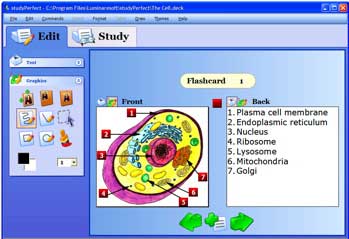 Has anyone heard about or used this study tool called "StudyPerfect"? It was reviewed in one of my geek blogs I follow called "Cool Tools". There is a cost of $25 per license, with discounts for multiple licenses, but it does offer a free trial download for 30 days.
One of my "high-maintenance" students is primarily an auditory learner, and she is having a difficult time in her Medical Terminology. I've passed this on to her with the thought that this might be a possible solution to her situation.
What are your thoughts? Do you have any other suggestions for this particular student?
THANKS!
Office 2007
I am looking at all that is available for Office 2007, trying to decide what to purchase for the library. There are step by step books, teach yourself visually books, plain and simple books, and bibles. So my question to those of you who are familiar with any of these resources is what do you like/dislike about them and why.
Thursday, November 01, 2007
Another Introduction Post
I see I'm not the only one who had the idea to make an introduction today. I'm glad; it makes this somewhat easier now that Serafin has gone first. My name is Krista Jacobson and I am the new Online Library Intern. I am thrilled to have been chosen out of a candidate pool of...one. As you can see, it wasn't exactly my resume that blew Emily away but instead the fact that I was ready and willing. That said, I actually feel incredibly fortunate as the topic of how Web 2.0 and Library 2.0 can enhance the distance learning experience has been of particular interest to me ever since I studied it as part of an Academic Libraries class. (In fact, if you're interested, you can check out a blog I created for the class examining both the positive offerings of Web 2.0 as well as some of the negative implications of the movement. It was an assignment and nothing groundbreaking but here is a link if you're curious. )
My background:
I am originally from WI. I attended UW Madison where I majored in French and Spanish. I then went to my hometown (Stevens Point) where I followed in the footsteps of my teacher parents and pursued my degree in education. After I graduated, I went to France where I taught English at the I.U.F.M. d'Angers (Institut Universitaire de Formation des Maîtres), a post graduate program for future teachers in France. After returning to the States, I taught French in a high school in IL for a year. I was planning on continuing to teach once I moved to the Twin Cities but I found a job outside of education while exploring what it would take to get a MN teaching license and discovered that I didn't miss being in a high school. I didn't want to leave education completely, however, and enrolled at the College of St. Catherine in the MLIS program.
To start, I'll be researching instant message programs for future instant message reference and social tagging software for the libraries. I know Amy from a class and I hope I'll get to meet the rest of you in the future. Unfortunately, I have a 8-5 job that prevents me from being able to participate in the phone call conferences and I'm not sure yet whether or not I'll be able to take a day off in two weeks for the full meeting. I hope so.
~Krista
My background:
I am originally from WI. I attended UW Madison where I majored in French and Spanish. I then went to my hometown (Stevens Point) where I followed in the footsteps of my teacher parents and pursued my degree in education. After I graduated, I went to France where I taught English at the I.U.F.M. d'Angers (Institut Universitaire de Formation des Maîtres), a post graduate program for future teachers in France. After returning to the States, I taught French in a high school in IL for a year. I was planning on continuing to teach once I moved to the Twin Cities but I found a job outside of education while exploring what it would take to get a MN teaching license and discovered that I didn't miss being in a high school. I didn't want to leave education completely, however, and enrolled at the College of St. Catherine in the MLIS program.
To start, I'll be researching instant message programs for future instant message reference and social tagging software for the libraries. I know Amy from a class and I hope I'll get to meet the rest of you in the future. Unfortunately, I have a 8-5 job that prevents me from being able to participate in the phone call conferences and I'm not sure yet whether or not I'll be able to take a day off in two weeks for the full meeting. I hope so.
~Krista
Tidbits from a Hybrid
The title might be a bit strange, Tidbits from a Hybrid, but it does reflect my academic training and interests throughout my career--I only have 7 more years to go. I obtained my first degree 35 years ago in the field of anthropology and psychology. It was a mere bachelor of arts degree, but something was something. I had been just recently discharged from the Army after my Vietnam tour in 1968-69. My Vietnam experience has had a lasting impression on me. But I have been able to cope with it all these years.
Shortly thereafter, I entered my first Masters program in library science, finishing the degree in two (2) full years with summers. I worked in residence; that is, there was no such a thing as "online" versions of obtaining a master's or doctorate degrees. I view negatively the "online" environment of obtaining a full education. A few years later, and working as a librarian in a local university in Puerto Rico, I went on to the obtain a second Master's degree in folklore and literature. Again, a residence program; no "online"; just plain old scholarship, reading and writing papers. It took me 2 years to finish it. By that time I was working at Gary Public Library (Indiana) as a reference and local history librarian. Immediately after graduating I went on to The University of Chicago to obtain a certificate of advanced studies beyond the Masters.
As you can see, I have been constantly studying and working for many years. It was a challenge to be both student, worker, husband and father, but the Lord helped me out; not to abandon my wife and children. They represented (and still do) the great priority in my life. About 2 years ago (I had been working on a doctorate in English language and literature for some 5.5 years), I was awarded a doctorate (non-online) in English from the University of Puerto Rico, with a specialty in Anglo-Caribbean literature. I have also been teaching English for the same amount of years. I guess, as you can appreciate it, I am a kind of hybrid, being a librarian, folklorist, professor of literature, poet and short story writer. It is probably this that gets me many times into trouble with supervisors.
I hope you enjoy this posting. By the way, this is my first or second posting, and I am just experimenting. I also have been blogging for a few years, and you can view my students' blogs at the following url: http://www.srs-pr.com/blog-2/ Sorry if I sound ego-centric; I am not, once you get to know me. See you all in two weeks or so ...... God bless. / Serafin Roldan
Shortly thereafter, I entered my first Masters program in library science, finishing the degree in two (2) full years with summers. I worked in residence; that is, there was no such a thing as "online" versions of obtaining a master's or doctorate degrees. I view negatively the "online" environment of obtaining a full education. A few years later, and working as a librarian in a local university in Puerto Rico, I went on to the obtain a second Master's degree in folklore and literature. Again, a residence program; no "online"; just plain old scholarship, reading and writing papers. It took me 2 years to finish it. By that time I was working at Gary Public Library (Indiana) as a reference and local history librarian. Immediately after graduating I went on to The University of Chicago to obtain a certificate of advanced studies beyond the Masters.
As you can see, I have been constantly studying and working for many years. It was a challenge to be both student, worker, husband and father, but the Lord helped me out; not to abandon my wife and children. They represented (and still do) the great priority in my life. About 2 years ago (I had been working on a doctorate in English language and literature for some 5.5 years), I was awarded a doctorate (non-online) in English from the University of Puerto Rico, with a specialty in Anglo-Caribbean literature. I have also been teaching English for the same amount of years. I guess, as you can appreciate it, I am a kind of hybrid, being a librarian, folklorist, professor of literature, poet and short story writer. It is probably this that gets me many times into trouble with supervisors.
I hope you enjoy this posting. By the way, this is my first or second posting, and I am just experimenting. I also have been blogging for a few years, and you can view my students' blogs at the following url: http://www.srs-pr.com/blog-2/ Sorry if I sound ego-centric; I am not, once you get to know me. See you all in two weeks or so ...... God bless. / Serafin Roldan
Wednesday, October 31, 2007
Screencast Ideas
Great news - Matt has given me permission to purchase the Camtasia Screencast software. This is a huge deal, as we will be able to produce screen casts at need, rather than having to wait for another department to develop them on our behalf.
I've already created the sample screencast that I blogged about a bit ago on creating a References page in APA style via Word. I am planning to redo that cast with improved audio and text. I am also working on screen casts of our programmatic information literacy presentations, which I hope we can offer to online students in the interim, while we are developing the course.
What other presentations should we develop? In the basic rules of screencasting, I would like each to be no more than 15 minutes in length (we can make a series if they need to be longer) and be comprised of screen shots or screen actions (not video). They need to have a script (because figuring out what to say on the fly is impossible). Ideas, anyone?
I've already created the sample screencast that I blogged about a bit ago on creating a References page in APA style via Word. I am planning to redo that cast with improved audio and text. I am also working on screen casts of our programmatic information literacy presentations, which I hope we can offer to online students in the interim, while we are developing the course.
What other presentations should we develop? In the basic rules of screencasting, I would like each to be no more than 15 minutes in length (we can make a series if they need to be longer) and be comprised of screen shots or screen actions (not video). They need to have a script (because figuring out what to say on the fly is impossible). Ideas, anyone?
NoodleBib for Bibliography Creation
Librarians,
During the call today (10/31), we'll be discussing the creation of campus-specific bibliographies for each program offered at your campus, in preparation for future accreditation team visits. This bibliographies are critical, as they offer team members a glimpse at holdings representative of our entire system. The agenda provided during the call provided you with a list of programs and the due dates for each bibliography.
It is my recommendation that you create these lists in NoodleBib. All of our citations will need to be in APA style, so this eliminates the confusion of whether or not your citations are accurate. Additionally, you can share the list easily, e-mail it easily, and make as many updates as you need to as frequently as needed.
I have created a login for each of you on Noodlebib - Username: firstname.lastname and Password: Rasmussen (this means some of you may have more than one username, if you created a username previously that was something other than firstname.lastname.)
After you login, on the My Lists page, select the Create a New Lists button. You can create as many lists as you want. You should create one list for each program (again, they are listed in the agenda).
From there, you just need to create your citations. Use the citation entire issue of a journal or magazine for the serials in your collection related to each program area.
Be judicious in your selection. While each of your bibliographies should list at least 20 books, do not simply "fill" the bibliography with titles that may be from a related program but have no actual bearing on the program in question (putting transcription texts on the Medical Assisting list, for example). I will be reviewing all lists for relevancy and completion.
This is a GREAT project for work studies.
As a side note, if you do not have a minimum of 20 items in a program area, this gives you a great opportunity to do some collection development. You may also want to collaborate with faculty to assure selection of the best titles for each area (for your list or for collection development). Finally, you may also wish to utilize the faculty annotated bibliographies to assist with this project.
-Emily
During the call today (10/31), we'll be discussing the creation of campus-specific bibliographies for each program offered at your campus, in preparation for future accreditation team visits. This bibliographies are critical, as they offer team members a glimpse at holdings representative of our entire system. The agenda provided during the call provided you with a list of programs and the due dates for each bibliography.
It is my recommendation that you create these lists in NoodleBib. All of our citations will need to be in APA style, so this eliminates the confusion of whether or not your citations are accurate. Additionally, you can share the list easily, e-mail it easily, and make as many updates as you need to as frequently as needed.
I have created a login for each of you on Noodlebib - Username: firstname.lastname and Password: Rasmussen (this means some of you may have more than one username, if you created a username previously that was something other than firstname.lastname.)
After you login, on the My Lists page, select the Create a New Lists button. You can create as many lists as you want. You should create one list for each program (again, they are listed in the agenda).
From there, you just need to create your citations. Use the citation entire issue of a journal or magazine for the serials in your collection related to each program area.
Be judicious in your selection. While each of your bibliographies should list at least 20 books, do not simply "fill" the bibliography with titles that may be from a related program but have no actual bearing on the program in question (putting transcription texts on the Medical Assisting list, for example). I will be reviewing all lists for relevancy and completion.
This is a GREAT project for work studies.
As a side note, if you do not have a minimum of 20 items in a program area, this gives you a great opportunity to do some collection development. You may also want to collaborate with faculty to assure selection of the best titles for each area (for your list or for collection development). Finally, you may also wish to utilize the faculty annotated bibliographies to assist with this project.
-Emily
Monday, October 29, 2007
My First (Official) Screencast
I've shared this with a few of you already, but here is a link to the YouTube posting of a screencast I worked on over the weekend. Thanks to a few speakers at MLA for their inspiration and exploration of the technology:
http://www.youtube.com/watch?v=reFXrhdvnmw
Please bear in mind that neither the sound quality nor the image quality in YouTube are all that fantastic; I will probably revise the sound on this cast later on. It's a good start, though, and I think a potentially great service for our students.
What are your thoughts?
-E
http://www.youtube.com/watch?v=reFXrhdvnmw
Please bear in mind that neither the sound quality nor the image quality in YouTube are all that fantastic; I will probably revise the sound on this cast later on. It's a good start, though, and I think a potentially great service for our students.
What are your thoughts?
-E
Speaking of Collection Development
From the Personal MBA Blog comes a rather definitive Business Books List.
I think that this would make a great set for any of our libraries. They will all be good for our business students (as well as anyone interested in a little professional improvement).
They also link to the list in Amazon. It may be easier to print it out from there (you just can't order it from there, unless you are using your own credit card, which I don't recommend).
-E
PS.. Anyone else have recommended reading/buying lists?
I think that this would make a great set for any of our libraries. They will all be good for our business students (as well as anyone interested in a little professional improvement).
They also link to the list in Amazon. It may be easier to print it out from there (you just can't order it from there, unless you are using your own credit card, which I don't recommend).
-E
PS.. Anyone else have recommended reading/buying lists?
Tuesday, October 23, 2007
Article from Paste Magazine
http://www.pastemagazine.com/action/article/5496/news/culture/googleyoutube_deploy_new_copyright_filtering_system
Article on what Google/YouTube are doing for copyright by using filters. (Something to think about if we put up instructional videos on YouTube).
Article on what Google/YouTube are doing for copyright by using filters. (Something to think about if we put up instructional videos on YouTube).
Retention.. Retention.. Retention...
Retention is a buzz word on all of our campuses.. and I often wonder what the library truly could do to help. Here are some resources that mention the library's role in Retention:
Predicting Higher Education Graduation Rates from
Institutional Characteristics and Resource Allocation
What’s Our Contribution To Retention
Collaborative Collection Development Team
I met with our OCLC representative last week, who shared some information with me about TitleDirect for Collaborative Collection Development through NetLibrary.
Basically, an Adminstrator (that'd be me) would identify Selectors to receive alert notifications in their program areas and be able to recommend titles through a kind of database.
Reviewers (that'd be you) would receive those notifications, review recommendations, specify quantities and purchase titles.
Specific to NetLibrary, we could just add the recommended titles to our pool. Once they are clicked on twice, we "purchase them". That way, we aren't just buying everything - only the things that will definitely be used. This is the way we bought all of our NetLibrary titles last year.
We could expand this plan, too, to title recommendations from publisher catalogs and RCL Web.
I think that we could sell this "Selector" idea to some of our faculty members. We would provide some kind of incentive (and you'd have to give me some ideas on this) to become a member of this team, and training on using these products. It would be a nice resume addition for any full-timer or for an adjunct interested in becoming full-time.
What are your thoughts?
Basically, an Adminstrator (that'd be me) would identify Selectors to receive alert notifications in their program areas and be able to recommend titles through a kind of database.
Reviewers (that'd be you) would receive those notifications, review recommendations, specify quantities and purchase titles.
Specific to NetLibrary, we could just add the recommended titles to our pool. Once they are clicked on twice, we "purchase them". That way, we aren't just buying everything - only the things that will definitely be used. This is the way we bought all of our NetLibrary titles last year.
We could expand this plan, too, to title recommendations from publisher catalogs and RCL Web.
I think that we could sell this "Selector" idea to some of our faculty members. We would provide some kind of incentive (and you'd have to give me some ideas on this) to become a member of this team, and training on using these products. It would be a nice resume addition for any full-timer or for an adjunct interested in becoming full-time.
What are your thoughts?
Hello from Rockford
Hello Everyone,
I am Cynthia Reynolds, the new librarian at the Rockford Campus. Since the Team Call is postponed for a week, I decided to introduce myself here and try my hand at the blog. I come from a background in corrections. After being a Correctional Officer for 20+ years, I went back to graduate school at the University of Illinois to obtain my MLS. I worked for two years at Rockford Public Library in Adult Services/Reference before I started here last Monday.
I really enjoy the positive, friendly, helpful environment at Rasmussen College. This week I am trying to get to many of the classrooms to introduce myself to faculty and students as there has not been a librarian here for several months. My head is still swimming with all I need to learn and I am sure I will need to call upon your expertise in many areas.
I look forward to meeting you all next month at the annual meeting.
I am Cynthia Reynolds, the new librarian at the Rockford Campus. Since the Team Call is postponed for a week, I decided to introduce myself here and try my hand at the blog. I come from a background in corrections. After being a Correctional Officer for 20+ years, I went back to graduate school at the University of Illinois to obtain my MLS. I worked for two years at Rockford Public Library in Adult Services/Reference before I started here last Monday.
I really enjoy the positive, friendly, helpful environment at Rasmussen College. This week I am trying to get to many of the classrooms to introduce myself to faculty and students as there has not been a librarian here for several months. My head is still swimming with all I need to learn and I am sure I will need to call upon your expertise in many areas.
I look forward to meeting you all next month at the annual meeting.
Monday, October 22, 2007
Intersting article from a blog on The Chronicle of Higher Education, Oct. 19. 'Where Plagiarism and Bad Editing Intersect'.
http://chronicle.com/blogs/footnoted/index.php?id=833
http://chronicle.com/blogs/footnoted/index.php?id=833
Saturday, October 20, 2007
Eye contact
I know that Eye Contact is definitely something that I could improve during workshops.. Sometimes I get so preoccupied with advancing the PowerPoint slides.. and pointing at the images on the screen, and I forget to establish eye contact with the students.
This article gives some tricks to improve this skill. click here.
This article gives some tricks to improve this skill. click here.
Wednesday, October 10, 2007
Greetings from Green Bay!
My name is Karen Eckberg, and I'm the campus Librarian at the Green Bay campus. It's the first RC in Wisconsin and as of today, there are approximately 35 students on campus. My job is three-fold. I'm the campus librarian, the Success Strategies instructor for 2 residential classes, and the Success Coordinator until we grow and they hire a full-time one. My first day was October 1st, and it's been a whirl-wind for the past month!
My background is in music, and I am a classically trained cellist and vocalist. I play in the Green Bay Civic Symphony, the non-professional orchestra in town. I went to graduate school at UW-Madison (my hometown) with the intention of becoming a music librarian, but the ones I met were all snobby (no joke!), so I broadened my scope to bibliographic instruction in the academic library. My first position out of graduate school was at Northland College in Ashland, WI, as the Reference and Instruction librarian. It was a fantastic for me, but it is a dying community and finding a position for my husband was not possible. So we moved to his hometown of Green Bay 6 years ago.
Another enjoyable, rewarding job in the library field was difficult to find, but I did work briefly at the library at UWGB, and then, most recently, at NWTC (the tech college) as grants specialist for the past 3 1/2 years.
I'm so very thrilled to have this opportunity and I look forward to meeting you all! Thanks to those of you who have already waved in Wisconsin's direction! And a huge THANKS to those of you who assisted in whatever way in getting this library off the ground, from collection development to cataloging!
The GB campus is slowly getting online, and we're involved in a number of cooperatives with other academic, public, school and special libraries. The highlight next week is introducing Rasmussen College at the Wisconsin Library Association conference which is located here in Green Bay! I've included pictures I've taken of the library. Enjoy!


You might have heard what Green Bay is famous for. GO PACK GO!
My background is in music, and I am a classically trained cellist and vocalist. I play in the Green Bay Civic Symphony, the non-professional orchestra in town. I went to graduate school at UW-Madison (my hometown) with the intention of becoming a music librarian, but the ones I met were all snobby (no joke!), so I broadened my scope to bibliographic instruction in the academic library. My first position out of graduate school was at Northland College in Ashland, WI, as the Reference and Instruction librarian. It was a fantastic for me, but it is a dying community and finding a position for my husband was not possible. So we moved to his hometown of Green Bay 6 years ago.
Another enjoyable, rewarding job in the library field was difficult to find, but I did work briefly at the library at UWGB, and then, most recently, at NWTC (the tech college) as grants specialist for the past 3 1/2 years.
I'm so very thrilled to have this opportunity and I look forward to meeting you all! Thanks to those of you who have already waved in Wisconsin's direction! And a huge THANKS to those of you who assisted in whatever way in getting this library off the ground, from collection development to cataloging!
The GB campus is slowly getting online, and we're involved in a number of cooperatives with other academic, public, school and special libraries. The highlight next week is introducing Rasmussen College at the Wisconsin Library Association conference which is located here in Green Bay! I've included pictures I've taken of the library. Enjoy!
You might have heard what Green Bay is famous for. GO PACK GO!
Thursday, October 04, 2007
NDLA: Laughing with Librarians
The theme of the NDLA convention I recently attended was Laughing with Librarians. In one session, we shared our funniest library stories.
Some of the stories revolved around misunderstandings. For example, someone told of a patron who wanted more of those "garlic and romance" books. Or the student who wanted a book about a donkey...a donkey named Odie....Donkey Odie. (You may have to read those out loud with a little imagination.)
The creators of the Unshelved comic strip were speakers at a general session. They showed a comic strip in which a patron had used a strip of bacon as a bookmark. They asked the librarians at the convention if anyone had ever had a patron use bacon as a bookmark, and someone had. The Unshelved guys said that in every group of librarians they've asked, at least one librarian has had a book with bacon as a bookmark.
What are some of your funniest library stories? Have you ever had bacon used as a bookmark? What's the oddest bookmark you've seen left in a book?
Some of the stories revolved around misunderstandings. For example, someone told of a patron who wanted more of those "garlic and romance" books. Or the student who wanted a book about a donkey...a donkey named Odie....Donkey Odie. (You may have to read those out loud with a little imagination.)
The creators of the Unshelved comic strip were speakers at a general session. They showed a comic strip in which a patron had used a strip of bacon as a bookmark. They asked the librarians at the convention if anyone had ever had a patron use bacon as a bookmark, and someone had. The Unshelved guys said that in every group of librarians they've asked, at least one librarian has had a book with bacon as a bookmark.
What are some of your funniest library stories? Have you ever had bacon used as a bookmark? What's the oddest bookmark you've seen left in a book?
Thursday, September 20, 2007
No wonder Copyright is so 'not with the times'!!!
Check out this article; The head of the U.S. Copyright office doesn't have a computer at home!
http://www.news.com/8301-10784_3-9779996-7.html
http://www.news.com/8301-10784_3-9779996-7.html
Friday, September 14, 2007
Database Demonstrations
Librarians:
Maybe the word "workshop" is not the best way to get the message across to some of our students. After all, a workshop implies 30 minutes to 60 minutes of PowerPoint presentations, handouts, and activities *blah*. And, after all, aren't students already subjected to that when they are in class?
Maybe, instead, we could consider using the terminology "Database Demonstrations" - and DO exactly that. Set up very informally - maybe have a few computers set up already pointed to a specific database. Offer one handout on the use of that database, and show students how to utilize it. Or, set up a computer with a power point about the database that continually restarts, and answer questions during the "demonstration".
Think about it like a Conference vendor display - maybe even have small prizes just for showing up :)
Maybe the word "workshop" is not the best way to get the message across to some of our students. After all, a workshop implies 30 minutes to 60 minutes of PowerPoint presentations, handouts, and activities *blah*. And, after all, aren't students already subjected to that when they are in class?
Maybe, instead, we could consider using the terminology "Database Demonstrations" - and DO exactly that. Set up very informally - maybe have a few computers set up already pointed to a specific database. Offer one handout on the use of that database, and show students how to utilize it. Or, set up a computer with a power point about the database that continually restarts, and answer questions during the "demonstration".
Think about it like a Conference vendor display - maybe even have small prizes just for showing up :)
Study-a-thon at Eagan

The Mentor Center Coordinator and I planned a Study-a-thon on Saturday Sept. 8th from 10-2. It was a huge success. About 30-35 students attended. We offered prizes (Wal-Mart gift cards) and food. Many students met in study groups. The Mentor Center Coordinator, tutors, and I were all available to answer many questions. It was great to see the library and computers labs buzzing with students studying for finals and finishing up research papers. In the future we are planning on doing more study-a-thons during a Saturday around Midterms and again at the end of the quarter. We think that Saturdays work best for students to not have conflicts with daycare, their classes, etc. I highly recommend doing this at other campuses. It is not always fun to come to work on a Saturday, but it was nice to get out early on Friday :)
Monday, September 10, 2007
Database Statistics ....
Our database statistics have tumbled over the past year.
Would anyone like to wager educated guesses as to why?
Would anyone like to wager educated guesses as to why?
Wednesday, September 05, 2007
Faculty Workshop?
I'm hoping to host a faculty workshop at the beginning of next quarter and am looking for some ideas on this. I've never given a faculty workshop, and for some reason I find it a little unnerving. I would love some advice on this and also to hear what has been done successfully in the past. Also, how long does the typical faculty workshop run? Thanks!
Tuesday, September 04, 2007
Wednesday, August 29, 2007
Favorite Success Links
Greetings library masters:
What are your favorite time management, stress reduction, test-taking, and general success links? Not databases, mind you - websites.
Gracias!
What are your favorite time management, stress reduction, test-taking, and general success links? Not databases, mind you - websites.
Gracias!
Friday, August 24, 2007
Open Workshops for Fall 2007
I'm looking for ways to revitalize my open workshops for fall quarter. What open workshops do you hold? What times of day have you found to work best? How do you market your workshops? How do you encourage/reward attendance? Do you hold your workshops in the library or elsewhere? I'd appreciate your input.
--Chandra
--Chandra
Tuesday, August 21, 2007
What are you reading...
Right now?
I don't mean this second, because obviously the answer would be "this blog" (hardy har har). What I mean is - what book, books, serial or serials are you reading? It doesn't have to be for work. I need some fresh ideas.
Gracias.
I don't mean this second, because obviously the answer would be "this blog" (hardy har har). What I mean is - what book, books, serial or serials are you reading? It doesn't have to be for work. I need some fresh ideas.
Gracias.
Monday, August 20, 2007
ILS/OPAC Vendors
As you know, when Heather and I attended ALA we were able to visit a number of ILS vendors. There is a spreadsheet on CHIPSnet that I created with vendors, their urls, our respective notes, etc . The document is in the OPAC Committee folder, and I have additional articles if you are interested.
Please take a look at the products and provide any feedback you may have on them- who do you like/don't like? Pros/cons?
Thank you!
Please take a look at the products and provide any feedback you may have on them- who do you like/don't like? Pros/cons?
Thank you!
Tuesday, August 14, 2007
Trading Cards Anyone?
To increase visibility and market library services to students Carleton College has created "trading cards" for each librarian. The librarians are caught in action poses (too funny) along with a description of their strengths, powers, and weaknesses. So cute! Check out the link http://apps.carleton.edu/campus/library/help/help/liaisons/cards/?page=1
I think we could definately do something fun like this - let's get that marketing team to work for us!
I think we could definately do something fun like this - let's get that marketing team to work for us!
Monday, August 13, 2007
Social Bookmarking Library Resources

I used to work at the William Mitchell Law School Library, and they updated their OPAC this past spring.
I really like their link for social bookmarking with options of Delicious, Google Bookmarks, Facebook, etc.
My images are blurry.. follow the link below to get the the Wmitchell catalog.
Wednesday, August 08, 2007
Library Course Questions
Per our meeting today, here are a few questions that we need to consider IMMEDIATELY regarding a self-paced library course?
-E
What are the objectives for this course? That is, what do we want our students to learn?
How do we offer lecture in this course? (PowerPoint, Video, Lecture Notes, Links, etc.)
What kind of activities do we offer to help students learn the material?
Should the cumulative (final) assessment be a paper, or a test? The paper would be a 3-paragraph paper with two References; would the test be multiple choice, matching, or a combo? For what it's worth, we could use a paper as a pre-assessment for the Information Literacy Piece for GAP.
How long should the course run? If it IS a 1-credit course, then we'd have to run it for three weeks.
How would we manage the course? That is, they are self-paced, but the librarians would have to participate in the courses to answer questions and complete grading the final assessment (unless it is a test, which could be auto-graded).
How would the blended model of this course work? Would you hold open workshops?
What other concerns or questions do you have?
-E
Tuesday, August 07, 2007
Website Features
Hello Librarians,
I met with Mark K. last week to discuss what we want our library page on the Student Portal to look like. Obviously, we will have some technical limits, but right now we have the opportunity share as many ideas and "wants" as possible, and I'd like to take advantage of that.
What are some features that you think we absolutely MUST have on the new page (if you like any that we have now, I suggest including those in your list).
What are some features that you'd like to have but may not be essential?
What are things you don't want to see on the new page?
Think outside the box on this one. Let's not just stick with links (although include those if you want) but also the way that individuals navigate to services, how we group services together, how we link out to resources, information about libraries that you want to include on the pages, interactive elements, etc.
Thanks-
I met with Mark K. last week to discuss what we want our library page on the Student Portal to look like. Obviously, we will have some technical limits, but right now we have the opportunity share as many ideas and "wants" as possible, and I'd like to take advantage of that.
What are some features that you think we absolutely MUST have on the new page (if you like any that we have now, I suggest including those in your list).
What are some features that you'd like to have but may not be essential?
What are things you don't want to see on the new page?
Think outside the box on this one. Let's not just stick with links (although include those if you want) but also the way that individuals navigate to services, how we group services together, how we link out to resources, information about libraries that you want to include on the pages, interactive elements, etc.
Thanks-
Subscribe to:
Posts (Atom)


